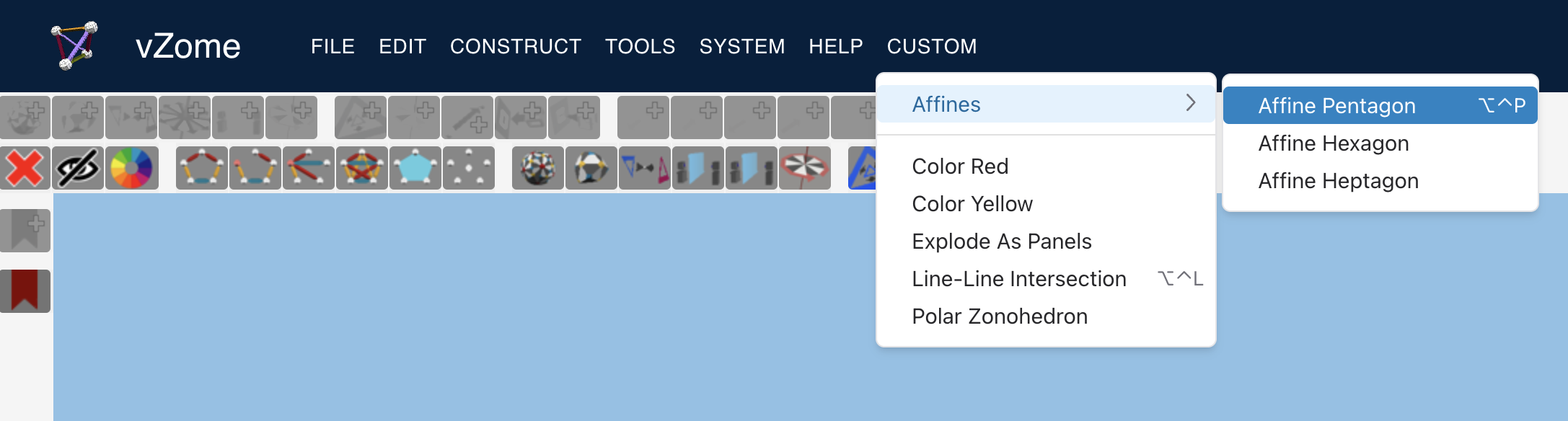
Users of desktop vZome have long had the ability to define a custom menu, either to define their own keyboard shortcuts for existing commands, or to access commands that are experimental and not available in the other menus. Now online vZome offers the same capability, actually with more features like submenus and dividers.
Configuring in Browser Local Storage
Configuration of the custom menu is a little tricky, since there is no UI for it yet, and it is very different from the equivalent configuration for desktop vZome. The configuration data is stored in the browser's local storage, and must be defined using the browser's developer tools.

Different browsers use different ways of accessing the developer tools, and the UI may
be organized and labeled a bit differently than you see in the figure above, but you
should be able to find the local storage area for https://www.vzome.com.
If you want help, find me on the Discord server,
and I'll be happy to get on a screen-share and walk you through it.
Once you've found the right storage area, you want to add an entry with key vzome-custom-menu.
In my browser, I had to double-click below the existing entries to add a new one.
The value to add has to be a JSON string; here's a simple example:
[ { "label": "Affine Pentagon", "action": "AffinePentagon", "key": "P" } ]
This defines a single menu item labeled "Affine Pentagon", which will perform the AffinePentagon
action. That action string has to be something vZome understands, of course;
see below to learn where you can find the known action strings.
Note that the JSON represents an array, even if you only want one custom menu item.
Keyboard Shortcuts
The most common reason for having a custom menu is to add a keyboard shortcut to an existing command, or to override the existing keyboard shortcut.
The JSON above associates a keyboard shortcut of control-option-P,
or control-alt-P for Windows. The control and option/alt
modifiers are the default, but you can change them by adding a "mods" property:
[ { "label": "Affine Pentagon", "action": "AffinePentagon", "key": "P", "mods": "⌥⌘" } ]
The following characters in the property value correspond to the four supported key modifiers:
⌥is option (alt on Windows)⌘is command (meta on Windows)⌃is control (NOT a caret,^; that is a different character)⇧is shift The order of the characters is not important.
Be aware that the browser itself intercepts certain key combinations for its own purposes,
so the one you have chosen may not work. For example, in my browser I cannot use ⌘5 or any
other number, since the browser uses that for tab selection.
Dividers
If you have a lot of custom menu item commands, the menu becomes harder to use. You can break up sections visually with dividers:
[
  { "label": "Color Red", "action": "setItemColor/ff3333ff" },
  { "label": "Color Yellow", "action": "setItemColor/ffff66ff" },
  { "divider": true },
  { "label": "Line-Line Intersection", "action": "StrutIntersection", "key": "L" },
  { "label": "Polar Zonohedron", "action": "PolarZonohedron" }
]
Submenus
To make a large menu more manageable, group items into submenus:
[
  {
    "label": "Affines",
    "submenu": [
      { "label": "Affine Pentagon", "action": "AffinePentagon", "key": "P" },
      { "label": "Affine Hexagon", "action": "AffineHexagon" }
    ]
  },
  { "label": "Color Red", "action": "setItemColor/ff3333ff" }
]
Remember that nested menus can be a little tricky to interact with, so you probably don't want to go three levels deep.
Limitations
As of this writing, the custom menu is limited to actions that operate on the design itself, usually with a selection, and that don't require any additional UI, such as a popup dialog.
This means that you won't be able to add a custom menu item to change the keyboard shortcut for things like "Save".
Future releases will include support for certain additional commands, such as exporting files in various formats.
Built-in Commands
To define a custom menu item, obviously you must know the action string
for that command, e.g. StrutIntersection for "Line-line intersection".
Many of the commands you might want to customize are in the "Edit" and "Construct" menus.
The corresponding JSON for those menus is provided here for you to copy action strings from.
Notice that you can omit the action when it is the same as the label.
[
  { "label": "Undo",     "action": "undo" },
  { "label": "Redo",     "action": "redo" },
  { "label": "Undo All", "action": "undoAll" },
  { "label": "Redo All", "action": "redoAll" },

  { "divider": true },

  { "label": "Cut" },
  { "label": "Copy" },
  { "label": "Paste" },
  { "label": "Delete" },

  { "divider": true },

  { "label": "Select All",          "action": "SelectAll" },
  { "label": "Select Neighbors",    "action": "SelectNeighbors" },
  { "label": "Invert Selection",    "action": "InvertSelection" },
  {
    "label": "Select",
    "submenu": [
      { "label": "Balls",            "action": "AdjustSelectionByClass/selectBalls" },
      { "label": "Struts",           "action": "AdjustSelectionByClass/selectStruts" },
      { "label": "Panels",           "action": "AdjustSelectionByClass/selectPanels" },
      { "label": "Automatic Struts", "action": "SelectAutomaticStruts" }
    ]
  },
  {
    "label": "Deselect",
    "submenu": [
      { "label": "Balls",  "action": "AdjustSelectionByClass/deselectBalls" },
      { "label": "Struts", "action": "AdjustSelectionByClass/deselectStruts" },
      { "label": "Panels", "action": "AdjustSelectionByClass/deselectPanels" },
      { "label": "All",    "action": "DeselectAll" }
    ]
  },

  { "divider": true },

  { "label": "Select Coplanar",     "action": "SelectCoplanar" },
  { "label": "Select Half Space",   "action": "SelectByPlane" },
  { "label": "Select by Diameter",  "action": "SelectByDiameter" },
  { "label": "Select by Radius",    "action": "SelectByRadius" },

  { "divider": true },

  { "label": "Group",   "action": "GroupSelection/group" },
  { "label": "Ungroup", "action": "GroupSelection/ungroup" },

  { "divider": true },

  { "label": "Hide",            "action": "hideball" },
  { "label": "Show All Hidden", "action": "ShowHidden" },

  { "divider": true },

  { "label": "Copy Last Selected Color",  "action": "MapToColor/CopyLastSelectedColor" },
  { "label": "Reset Colors",              "action": "MapToColor/SystemColorMap" },

  {
    "label": "Color Effects",
    "submenu": [
      { "label": "Complement",           "action": "MapToColor/ColorComplementor" },
      { "label": "Invert",               "action": "MapToColor/ColorInverter" },
      { "label": "Maximize",             "action": "MapToColor/ColorMaximizer" },
      { "label": "Soften",               "action": "MapToColor/ColorSoftener" },
      { "label": "Darken with Distance", "action": "MapToColor/DarkenWithDistance" },
      { "label": "Darken near Origin",   "action": "MapToColor/DarkenNearOrigin" }
    ]
  },

  {
    "label": "Map Colors",
    "submenu": [
      { "label": "To Centroid",                          "action": "MapToColor/RadialCentroidColorMap" },
      { "label": "To Direction",                         "action": "MapToColor/RadialStandardBasisColorMap" },
      { "label": "To Canonical Orientation",             "action": "MapToColor/CanonicalOrientationColorMap" },
      { "label": "To Normal Polarity",                   "action": "MapToColor/NormalPolarityColorMap" },
      { "label": "To Octant",                            "action": "MapToColor/CentroidByOctantAndDirectionColorMap" },
      { "label": "To Coordinate Plane",                  "action": "MapToColor/CoordinatePlaneColorMap" },
      { "label": "System by Centroid",                   "action": "MapToColor/SystemCentroidColorMap" },
      { "label": "Nearest Predefined Orbit",             "action": "MapToColor/NearestPredefinedOrbitColorMap" },
      { "label": "Nearest Predefined Orbit by Centroid", "action": "MapToColor/CentroidNearestPredefinedOrbitColorMap" },
      { "label": "Nearest Special Orbit",                "action": "MapToColor/NearestSpecialOrbitColorMap" },
      { "label": "Nearest Special Orbit by Centroid",    "action": "MapToColor/CentroidNearestSpecialOrbitColorMap" }
    ]
  }
];
const items = [
  { "label": "Loop Balls",               "action": "JoinPoints/CLOSED_LOOP" },
  { "label": "Chain Balls",              "action": "JoinPoints/CHAIN_BALLS" },
  { "label": "Join Balls to Last",       "action": "JoinPoints/ALL_TO_LAST" },
  { "label": "Make All Possible Struts", "action": "JoinPoints/ALL_POSSIBLE" },
  { "divider": true },
  { "label": "Panel",                    "action": "panel" },
  { "label": "Panel/Strut Vertices",     "action": "ShowVertices" },
  { "label": "Panel Normals",            "action": "ShowNormals" },
  { "divider": true },
  { "label": "Centroid",                 "action": "NewCentroid" },
  { "label": "Strut Midpoints",          "action": "midpoint" },
  { "label": "Panel Centroids",          "action": "PanelCentroids" },
  { "label": "Panel Perimeters",         "action": "PanelPerimeters" },
  { "divider": true },
  { "label": "Line-Line Intersection",   "action": "StrutIntersection" },
  { "label": "Line-Plane Intersection",  "action": "LinePlaneIntersect" },
  { "label": "Panel-Panel Projection",   "action": "PanelPanelIntersection" },
  { "label": "Cross Product",            "action": "CrossProduct" },
  { "label": "Normal to Skew Lines",     "action": "JoinSkewLines" },
  { "divider": true },
  { "label": "Ball At Origin",           "action": "ShowPoint/origin" },
  { "divider": true },
  { "label": "2D Convex Hull",           "action": "ConvexHull2d" },
  {
    "label": "3D Convex Hull",
    "submenu": [
      { "label": "Complete",               "action": "ConvexHull3d" },
      { "label": "Panels Only",            "action": "ConvexHull3d/onlyPanels" },
      { "label": "Struts Only",            "action": "ConvexHull3d/noPanels" }
    ]
  }
];